

Living Learning Communities (LLCs)
First-Year Student LLC Housing Process
Incoming first-year students interested in joining a Living Learning Community (LLC) can indicate the preference on the Housing and Food Service (HFS) Contract in eLiving after accepting the Offer of Admission and Housing and Food Service (HFS) Contract through MyPennState.
You can update your preferences until the modification deadline of noon ET June 1 for summer session and noon ET June 15 for academic year.
- LLCs are only available during the academic year and are not an option for summer session.
- Space in some LLCs is limited, and while we do our best to match students with their preferred community, not all requests can be accommodated.
- Some LLCs require a secondary application through the associated college or department.
- LLC requests are prioritized over housing area, room type, and roommate preferences. We recommend only requesting an LLC if you truly want to be a part of the community.
- First-year students can indicate a roommate preference on the HFS Contract. While we try to honor these requests, roommate matches are not guaranteed, especially in LLCs where space is limited. In these cases, priority is given to accommodate LLC requests.
Current Students LLC Housing Process
Living Learning Communities (LLCs) offer a vibrant and supportive living environment with designated on-campus housing space for active members. Several LLCs provide students the opportunity of a return-to-living-environment beyond the first-year, provided the student maintains active status with the LLC. Current LLC members eligible to return enjoy the unique benefit - the ability to self-select their room assignment for the next academic year - a privilege that is not available to any other student group.
The following LLCs offer eligible upper-class students a return-to-living-environment in the LLC designated housing space:
| Ally House | Global Engagement Community |
| Arts & Architecture (A&A) | Information Science & Technology (IST) |
| Business and Society House (BASH) | Professional Golf Management |
| Earth and Mineral Sciences (EMS) | Schreyer Honors College |
| EARTH House | Schreyer Honors College GLOBE |
| Engineering House (E-House) | STEM (current FISE members select a new LLC) |
| Forensic Science | Women in Science & Engineering (WISE) |
Eligibility Guidelines
Current LLC Members: Returning Next Year
If you're a current member of an LLC and are interested in living in the LLC again next year, you'll need to meet the eligibility requirements established by the LLC to receive a housing offer for the next academic year. Each LLC has a designated Housing Chair who helps track member eligibility, which vary by LLC. To remain eligible, students must maintain active status in the LLC for both the fall and spring semesters.
If you accept an LLC HFS Contract but later do not actively participate in the LLC, your eligibility may be reviewed. The LLC Housing Chair has the ability to update your status, and if you are no longer eligible to return to the LLC for the upcoming academic year, you will be reassigned to another housing option.
Current LLC Members: Exploring Housing Options for Next Year
If you're a current LLC member and plan to live on campus next year but not within the LLC, you'll need to participate in the LiveOn Housing Process. Due to your LLC membership, you may still receive an HFS Contract offer for the LLC. If you do not wish to return to the LLC, simply do NOT accept the offer. It will automatically expire after the indicated Deadline to Complete.
Current Students Interested in Joining a LLC
For students interested in joining an LLC and have already accepted an HFS Contract for the upcoming academic year, the Preferred Housing Option Waitlist feature can be used to indicate your interest in reassignment.
LLC Housing Process Timeline
Eligible students interested in returning to the LLC for the next academic year need to participate in the LiveOn Housing Process and must Request Housing during the established timeframe. As part of this process, you will receive a direct Housing and Food Service (HFS) Contract offer specifically for the LLC.
2027-28 Academic Year
| Date | Time | Action |
|---|---|---|
| Thursday, Oct. 1 | 12 p.m. (noon) | Request Housing in eLiving opens |
| Tuesday, Nov. 3 | 12 p.m. (noon) | Request Housing in eLiving closes |
| Thursday, Nov 5 | 2-5 p.m. | HFS Contract offers released for eligible LLC members |
| Monday, Nov. 9 | 12 p.m. (noon) | LLC HFS Contract offers Deadline to Complete |
| TBA | 12 p.m. (noon) | Room Availability Displays in eLiving |
| TBA | Room Assignment Self-Selection |
* If you want to return to the LLC - accept the LLC HFS Contract offer before the indicated Deadline to Complete.
If you decide to NOT return to the LLC, simply do NOT accept the LLC Contract offer. The offer will automatically expire, and you'll be eligible to receive an invitation during the LiveOn Housing Process, where you can explore and and select another housing option that fits your needs.
If an eligible LLC member does not receive an HFS Contract offer on Nov. 5, the Housing Assignment Office may release additional LLC HFS Contract offers during the LiveOn Housing Process invitation release dates.
Room Assignment Self-Select Process
Current LLC members eligible to return enjoy the unique benefit - the ability to self-select their room assignment for the next academic year - a privilege that is not available to any other student group.
Learn More!
- Watch the LLC LiveOn Room Self-Selection Process recording (link to be added soon) to learn more about the housing process.
- View the LLC LiveOn Room Self-Selection Process Scribe (link to be added soon) for a detailed, screen-by-screen overview.
Self-Select Process Overview
How to self-select your room assignment:
- Browser Tip: When accessing eLiving, use a web browser other than Chrome to ensure optimal performance. Chrome may interfere with room selection functionality.
- Review 2027-28 academic year housing and food rates.
- Available rooms for your specific LLC will be displayed in eLiving starting on the date listed on timeline. You cannot select a room until your assigned date and time. Only designated rooms for your LLC will be displayed. Room availability may differ from the current year due to space reserved for incoming first-year students or medical accommodations.
- Once a room is selected, it will no longer appear as available.
- Each LLC determines the order in which students are scheduled to self-select a room. This may be based on points earned, semester standing, etc. The Housing Assignment Office does not determine this order.
- Your assigned self-select date and time displays in eLiving > Summary > LLC HFS Contract . The first section of your LLC HFS Contract also displays the process and start date and time.
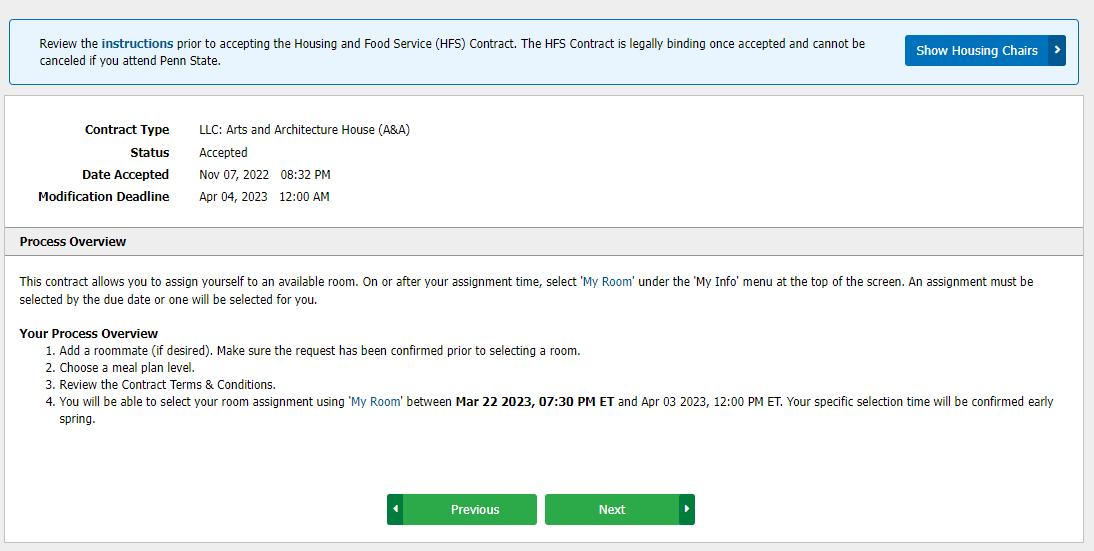
- Room assignment changes can be made until 12 p.m. (noon) on the deadline indicated on the timeline.
- If a student does not select a room, the Housing Assignment Office will process a room assignment on their behalf - not selecting a room will not release the student from the HFS Contract obligation.
Roommate Requests
Requesting a roommate in your LLC
If you'd like to live with a roommate in your LLC, here's what you need to know:
- Both students must have accepted a HFS Contract for the same LLC to participate in the self-select process.
- Each student must enter their roommate's Penn State Access Account in the "Housing Contract Data" section.
- Roommate requests must be mutual - both students must indicate each other as a roommate preference for the request to be confirmed.
- Once the roommate status shows as confirmed, the student with the earliest self-select date can choose a room assignment for both students. The roommate pair should confirm who has the earliest self-select date.
- For confirmed roommate pairs, only rooms that can accommodate both students will be displayed during selection.
- Room assignments can be changed until the indicated deadline. However, if one student in the pair changes their room assignment after the initial selection, the room change is only applied to that student, not the roommate. The roommate will also need to process the room change if they wish to move as well.
Requesting a roommate who is not your LLC
If you'd like to request a roommate who is not a member of your LLC, you can still indicate them as a roommate preference. Here's how it works:
- Enter your roommate's Penn State Access Account as a roommate preference. The roommate's name will show as pending.
- Roommate requests must be mutual - both students must list each other as a roommate preference. Housing preferences can be updated in eLiving > Contracts > Update Preferences until the housing preferences modification deadline.
- When you self-select a room assignment, the non-LLC roommate request will not be assigned at that time.
- The Housing Assignment Office will review roommate requests to determine if it's feasible to assign the pair together. If there is not enough space in the LLC to accommodate both students, they may be assigned to a different housing area.
This process allows flexibility while maintaining the integrity of LLC housing assignments. Be sure to communicate with your roommate and check your preferences before the deadline!
Timeline
| 2027-28 academic year | |
|---|---|
| Date | Action |
| TBA | Room Availability Displays |
| TBA | Self-Selection Opens |
| TBA | Deadline to self-select room |
| Tuesday, July 27 | Room assignments posted |
How to Self-Select a Room Assignment
These steps should be followed at the student's scheduled self-select time:
- Log on to eLiving using a web browser other than Chrome
- REFRESH YOUR BROWSER >>>>> This action is important if the student logged in to eLiving prior to their scheduled begin time. Refreshing the browser at the designated time will update the page so it allows the self-selection process to be active
- Go to My Info > My Room
- Select the correct campus and contract period UP > fall 2027-spring 2028
- If applicable, add roommate preference in the "Housing Contract Data" section on the My Room page.
- Under the Room Search section, click on the available area, building, floor, and room types to view the list of available rooms
- Select a room
- Click the Take This Room button to confirm choice
The Take This Room button will NOT APPEAR unless it's the students scheduled time to select a room!
If multiple students are trying to select the same room at the same time, the system can only assign one person to the room. Depending on who clicks the "Take This Room" button first, it is possible that a student may NOT be assigned to the selected room. - Confirm room selection has been processed by making sure that the room selected appears in the top section of the My Room page
Room Assignment
During the LLC self-selection timeframe, students will be able to view their selected room assignment in eLiving.
- After the self-selection process ends, the room assignment display feature will be turned off. This allows the Housing Assignment Office to process room assignments for other students
- LLC members' room assignments will NOT change unless a change is necessary to accommodate a roommate pair.
- Room assignments will be viewable again on the posting date and will display your room and building assignment and roommate(s) - name, Penn State Access Account, and cell phone (if available).
To view your room assignment, go to eLiving > My Info > My Room
| 2027-28 academic year | |
|---|---|
| Date | Action |
| TBA | Room Availability Displays |
| TBA | Self-Selection Opens |
| TBA | Deadline to self-select room |
| Tuesday, July 27 | Room assignments posted |
All LLCs are open to all qualified students without regard to race, age, color, sex, sexual orientation or other protected class. Auxiliary and Business Services and Penn State Housing, Dining and Residence Life are committed to building a community of belonging for all.